


Showing posts with label webtricks. Show all posts
Showing posts with label webtricks. Show all posts
-
Ultimate Guide :How to configure Mozilla Firefox profiles
One of the greatest feature of Mozilla Firefox is to use its user profile feature efficiently.
Everyone in this world is individual with his/her own interests and secrets.
So everyone needs his/her own configuration on his/her browser, but it ain't possible always as there are multiple users and you can't restrict everybody.
Also you may be the lone user but you may need multiple configurations because of your multitude interests.
Another reason to create a profile is to password protect your saved configurations from others.
So here are some steps you guys can follow to create and customize your profile.- Go to start and then run and type following if you use Windows:
%APPDATA%\Mozilla\Firefox\Profiles\xxxxxxxx.default\
- It will show your default profile.
%APPDATA%\Mozilla\Firefox\Profiles\
It will simply will take you to location here profiles are saved.- For creating new profile go to run and type :
Firefox.exe -profilemanager- Then you will see a similar window like below containing options create profile , renaming profile and delete profile, since you never made one so it will contain only one profile by the name of default.
- Now you create new profile or rename the existing one.
- You can check the option to set your default profile or can keep the option of asking each time. Another option which you can utilize is that you can load your backup profile if you carry one.

- If you don't have one you can simply make a newer by using a tool Mozbackup. It is advisable to backup your profile because it makes your setting portable wherever you go you can simply carry this backup with you either in any portable device or upload it to your safe hosting space on internet. You gotta save it because it contains all those important details like passwords, your browser configurations, websites personal settings and cookies.

- Next time whenever you wanna restore your profile backup you open the Mozbackup and check the restore option and simply provide the path to backup file's location. Restart Firefox and simply see the magic.

- Another thing u must take care of because of security reasons is to password protect your profile by creating a master password.
- For that go to Tools-->Options-->Security and check master password button and a pop up will come asking you for password.

- Enter password and next time whenever you or anybody will visit your critical pages suppose your adsense account you will be asked to enter the password.
DOWNLOAD
Mozbackup
Keep \m/ing
more
-
Redirect your all mails to your Gmail account.
It may be the silliest trick I am telling you guys if you know it, but if you don't you must know it. It is possible to redirect all your mails from Yahoo, AOL or any other POP3 mail service to your one desired Google account.
It will be suitable to you if you have tonnes and tonnes of email accounts and you usually forget to check all of them or you don't have enough time to check all of them.
It will save your bandwidth, it will save your time.
So login to your Gmail account, go to settings.Now hit add other accounts.
Now enter your five shortlisted accounts here.
You get various option so importing contacts, labels etc.
Check whatever you want submit. Now within two days you'll see you mail inbox with redirected mails.
There is another tool available send mail form other IDs, even you can get reply on another ID. You must try these tools once.
Keep \m/ing
more
-
Write for KNOL!!!!
Google the juggernaut in the internet is launching and planning to launch a lot new projects such as, recently they launched Chrome (Google's first browser) in beta version and they are planning to launch their very own Operating System.
Google has also launched their encyclopedia KNOL for competing with another juggernaut in knowledge units Wikipedia. Google like always have also included users from entire world in this project. They are giving opportunities to users to write articles on any subject they wish.
I am telling you the procedure through which you can also write and add other features in your articles.- First of all login to your google account here:

- Now start writing here :

There are a lot of word processing features which you can use.- After finishing through your article publish your post.
- One more exciting feature which knol offers is that you can attach your adsense account here with your posts.
- Go to settings and then adsense. They will review for two weeks.
- This is how your article will look
- .

Change text size:
Medium
Large
more - First of all login to your google account here:
-
ANYLYSE YOUR WEBSITE/BLOG STATS
Hey if you are very much into your Blog/Website and work very hard on it, I mean you wanna make it professional. Then you need all statistics that tell you what content you should post. Page views, visitors , visitor location, entry page, exit page, page ranking. What if all these statistics are available to you at one place. I give you demonstration of these statistics for my blog.
First page views/visitors: Recent Visitors Details:
Referral URLs:
Page Ranking Details:
If you like the details then don't waste your time and follow link and register your blog/website here.
http://www.sitemeter.com/?a=home
Keep \m/ing
If you like plz give response or help by anyway because it takes a lot of effort to make such tutorials.
more


-
WANNA MAKE A SITE (NOT JOKING)
I am serious guys if you want to make your own website and you are not going to spent a single penny then I have a solution for you.
So here we start making your site:-
Step 1:
Getting a free domain.
1) A Domain Name (You may also use your existing one)http://www.x10hosting.com/
This is the one I choose and I found it good. It provides hosting space up to 40 GB with Google adsense and Amazon ads integrated.
Choose your domain and just follow through steps.
If you want to know more about free hosting websites here is the code link:http://www.free-webhosts.com/free-mysql-database.php
It contains 115 websites that provide free webhosting .
Step 2:
2) A Google Adsense account and an Amazon Affiliate Account.
Now next step is to attach Google adsense and Amazon account to your website.
Google Adsense:Code: http://www.google.com/adsense
Amazon Affiliate:
Step 3Code: http://affiliate-program.amazon.com/gp/associates/join
Getting traffic to your website.
Here I am giving some sites which will provide you traffic for your site:Code: www.dmoz.comCode: www.faves.comCode: www.bookmarksync.comCode: del.icio.usCode: www.digg.comCode: www.diigo.comCode: www.furl.netCode: www.simpy.comCode: www.fark.comCode: www.newsvine.comCode: www.reddit.comCode: www.stumbleupon.comCode: www.thoof.comCode: http://docs.yahoo.com/info/suggest/
Guys I tell you one thing , its really very easy to create a site but very difficult to maintain one. You gotta rub your ass very hard. You have to spent hours on it.
Keep \m/ing
more
-
ANALYSE YOUR WEBSITE/BLOG
If you have a website or blog and you always wondered how much rank my site stands, how many page view it have? If you have these statistical question about you website/blog then I have a very good tool for this.
(1) Go to http://www.alexa.com and enter the site you want to know statistics of.
(2) My blog's ranking is pissed off that why I didn't enter my own blog address :P ,Guys plz help me with my ranking. Plz visit regularly.
(3) But you will install Alexa Toolbar you will get small widget working in your browser (See in pic). It shows Rank and traffic address of each site you enter for e.g. in this pic www.naukri.com have rank of 256 and traffic details of past time has also been shown.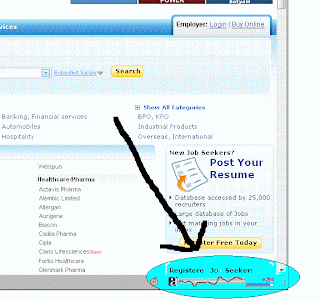
(4) If you wanna have this toolbar in your own browser, click here:
Alexa Toolbar
Keep \m/ing.
more


-
CHANGE YOUR IP
Here I have simple and fast tutorial for changing your IP on LAN and certain other network types( Except Broadband) .
First know your own IP.
1. Click on "Start" in the bottom left hand corner of screen
2. Click on "Run"
3. Type in "command" and hit ok
4. Type "ipconfig /release" just like that, and hit "enter"
5. Type "exit" and leave the prompt
Now change IP:-
6. Go to control panel-->Network connections
7. Chose your network connection and right click on tab.
8. Click on properties, press Networking tabs. Now double click on TCP/IP.
9. Click on "Use the following IP address".
10. Create an IP address (It doesn't matter what it is. I just type 1 and 2 until i fill the area up).
11. Press "Tab" and it should automatically fill in the "Subnet Mask" section with default numbers.
12. Hit the "Ok" button here
Job is done, your IP has been changed.
You should know how to get back the original one.
13. Right click on your network tab.
14. Go back to the "TCP/IP" settings
15. This time, select "Obtain an IP address automatically"
16. Hit "Ok" again
more
-
NOW EARN MORE WITH BIDVERTISER (ADS)
If you think that adsense is the end of world for your blog/website for your earning , you are totally wrong. There is something other than adsense which is more reliable, more easy and more profitable.
Yes Bidvertiser is another money earning tool which you can add to your site.
Nice thing is that it pays you after you earn only 20$ as compared to adsense's 100$.
Another advantage is that money is directly transferred to PAYPAL.
Now place BIDVERTISER ads with ADSENSE ads and earn more.
more
-
RSS STUFFF!!!
HEY FOLKS!
All of you must have seen RSS kind thing in many websites especially podcast websites moreover in web 2.0 sites. Today I am going to post one video which will clearly explain what the heck is RSS.
more
Subscribe to:
Posts (Atom)